
Live Slideshow: Guest Photos on the Big Screen in Real Time
Launch the Live Slideshow directly from your admin dashboard and every guest upload appears on the big screen the moment it arrives — no extra software, no HDMI adapter scramble, no setup.
Try It Now
Guest photos appear on the big screen the instant they are uploaded — no delay, no manual refresh.
Instant display
Every upload goes live on the screen within seconds. No manual refresh, no waiting — guests see their own photos appear as they upload them.
One click to launch
Open the Live Slideshow directly from your admin home — cast it to any screen, TV, or projector connected to your venue setup. Nothing to install.
Gets guests involved
When guests see their photos on the big screen in real time, they upload more. The slideshow turns passive attendees into active contributors.
How it works
- 1.Open your admin dashboard: log in to your Easy Wedding Album account and land on your album home page.
- 2.Click Live Slideshow: the button is right there on the home screen of your admin panel — no digging through menus.
- 3.Cast or mirror to any screen: open the slideshow URL on any device connected to your venue TV, projector, or monitor. It runs in fullscreen in the browser.
- 4.Sit back: as guests scan the QR code and upload photos, they appear on the big screen automatically — one by one, in real time.
Where to find the Live Slideshow in your admin
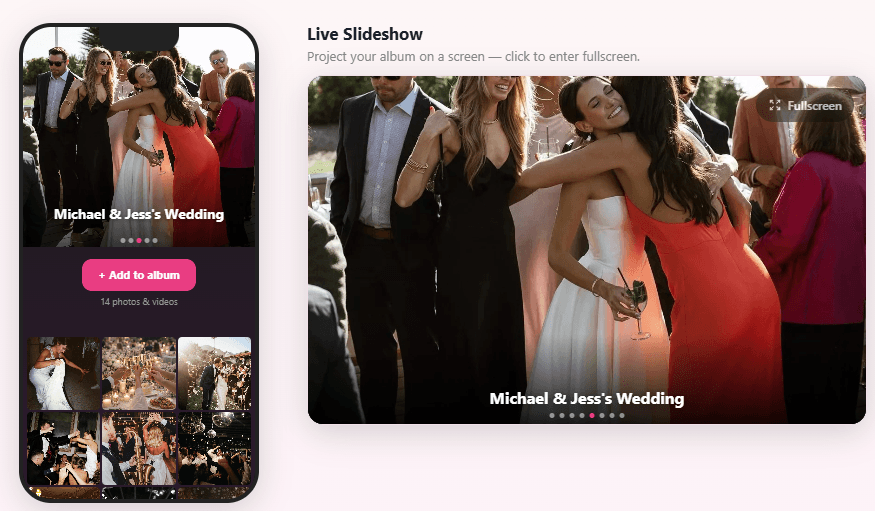
The Live Slideshow button appears directly on your album home — one click to open the fullscreen display.
What you get
- Real-time photo display as guests upload
- Fullscreen mode for TVs and projectors
- Launched in one click from your admin home
- Works with Photo Moderation — only approved photos show
- No app or software to install at the venue
- Included — no extra cost
Why the Live Slideshow changes the reception experience
Traditional wedding slideshows require a laptop, specific software, someone to manage it, and usually a stressful 20-minute setup at the venue. The result is a fixed set of pre-selected photos playing on a loop — no surprises, no guest involvement.
The Live Slideshow flips that completely. Instead of a curated loop, it becomes a live feed of the party itself. A guest snaps a candid at the bar, uploads it with the QR code, and five seconds later it's up on the screen. The reaction from the room — laughter, pointing, calling out friends — is the kind of energy no playlist can manufacture.
Couples also told us that a visible slideshow encourages guests who hadn't yet uploaded to pull out their phones. When people see the screen filling up with real moments, they want to contribute. It turns the album from a quiet background feature into a live centrepiece of the reception.
Perfect for…
The cocktail hour
Project the slideshow during cocktails so guests arriving late can see the first ceremony photos live as they walk in.
Dinner & dancing
Run it on a side screen during the reception meal. Guests share more when they can see their shots displayed in real time.
Photo booths & stations
Set up a photo station near the QR code and show the live feed right next to it — guests can see themselves appear seconds after uploading.
Combined with Photo Moderation
Enable Photo Moderation alongside the slideshow. Only photos you approve appear on screen — the perfect safety net for a family audience.
Turn your reception screen into a live photo wall
The Live Slideshow is live now for all albums — new and existing. No upgrade, no add-on. It's part of the $29 one-time payment alongside unlimited photos, video uploads, and Photo Moderation.
Ready in 2 minutes
Frequently Asked Questions
Where do I find the Live Slideshow?
Log in to your Easy Wedding Album account. The Live Slideshow button is on the home page of your admin dashboard — no navigation required.
What screen or device do I need?
Any device with a browser will work — laptop, tablet, smart TV. Open the slideshow URL on the device connected to your venue screen and switch to fullscreen (F11 on most browsers). No app, no HDMI dongle required beyond your usual venue setup.
How quickly do photos appear after a guest uploads?
Typically within a few seconds. As soon as a guest completes an upload, the slideshow picks it up and displays it automatically — no manual refresh needed.
Can I use Photo Moderation at the same time?
Yes — and we recommend it. When Photo Moderation is enabled, only photos you have approved will appear on the Live Slideshow. You get the energy of a real-time display with full control over what the audience sees.
Does the slideshow work during the whole event or just part of it?
It runs for as long as you keep the browser tab open. You can start it at the cocktail hour, pause it, and resume it for dinner or dancing — completely flexible.
Is the Live Slideshow included in the $29 plan?
Yes. The Live Slideshow is included at no extra cost in the one-time $29 payment, alongside unlimited photos, video uploads, and Photo Moderation.