
Why Asking Guests to Download an App Doesn't Work
You've seen it happen at other weddings. The couple announces a photo-sharing app, a few tech-savvy guests install it, and the rest forget about it within five minutes. By the end of the night, you're left with a half-empty album and dozens of photos scattered across private phone galleries you'll never access.
The problem isn't laziness — it's friction. Every extra step between "I just took an amazing photo" and "I shared it with the couple" loses guests along the way. Here's what typically happens:
App store friction
Guests need to find the app, wait for the download, create an account, and verify their email — all while the music is playing and the dance floor is calling.
Storage and compatibility issues
Older phones may not support the app. Guests with full storage can't install anything new. Android and iOS versions sometimes differ. It's a support nightmare at the worst possible time.
Privacy hesitation
Many guests are uncomfortable installing unknown apps that request access to their entire photo library. Some simply refuse — and you lose their photos forever.
Older guests left behind
Your grandparents, aunts, and older family friends are often the ones with the most heartfelt photos — and the least likely to figure out a new app under party conditions.
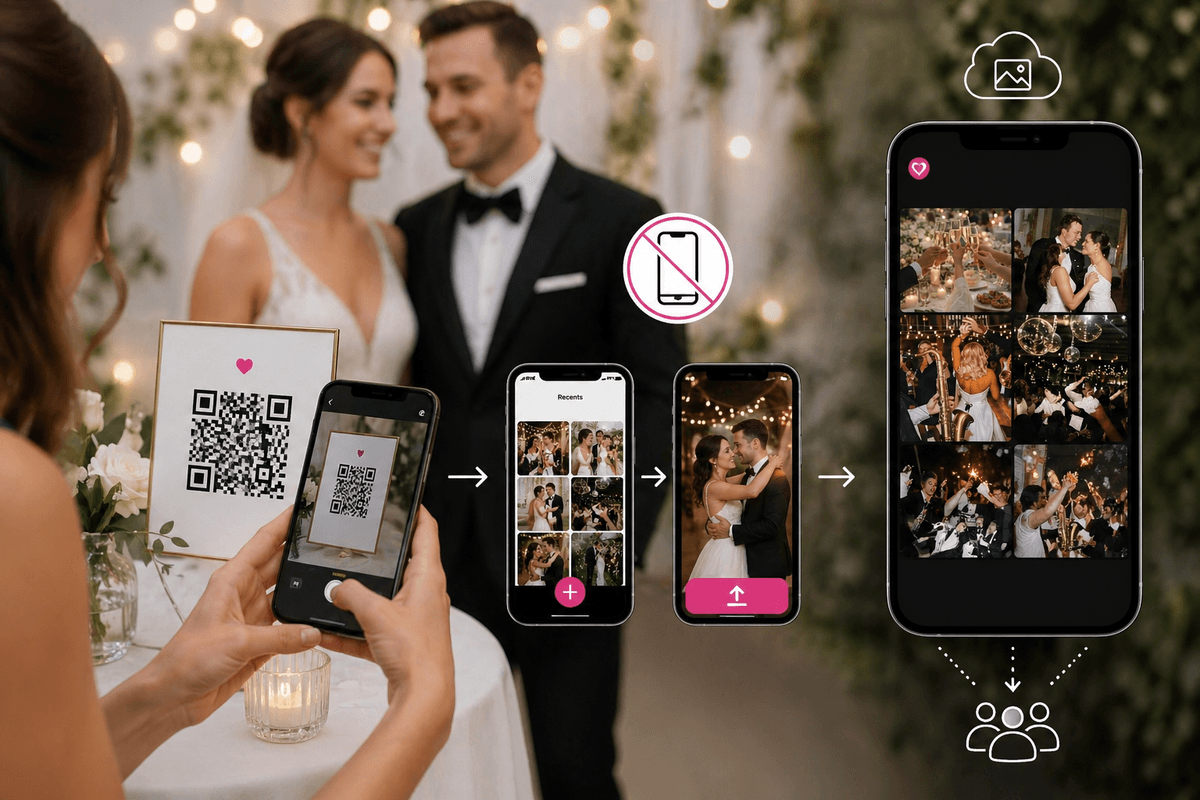
The solution? Remove the app entirely. A simple QR code that opens a browser page is something every guest already knows how to use — no downloads, no accounts, no friction.
How QR Code Photo Sharing Works — Step by Step
The entire process takes less than two minutes to set up and zero effort from your guests.
Create your album online
Sign up at Easy Wedding Album, choose your couple names, and pick a theme. Your unique QR code is generated instantly. You can customize the upload page with your wedding colors, a photo of the two of you, and your date.
Print or display the QR code
Download the QR code and add it to table cards, the welcome sign, or place cards. You can also display it on a TV or projector screen. Many couples include it in the wedding invitation or program too, so guests are already familiar with it before the day.
Guests scan and upload
Guests point their phone camera at the QR code. Their browser opens immediately — no app download, no account creation. They select their photos and videos, tap upload, and they're done. The whole process takes about 10 seconds.
Watch the live slideshow
As photos arrive, they appear in real time on any screen you connect. Set up a TV at the reception and watch the slideshow fill up with candid moments throughout the evening. Guests love seeing their photos appear — it creates a wonderful interactive atmosphere.
Download everything after the wedding
All photos and videos are stored in full resolution. After the wedding, download the entire album with one click. Photos are sorted by when they were taken, guests can drop them into folders by moment (ceremony, party, brunch…) and add their first name, so you don't have to sort through hundreds of images manually.
Why Couples Choose QR Code Over Apps
Zero friction
No downloads, no accounts, no sign-up forms. Works on every smartphone with a camera — which is all of them.
Real-time slideshow
Display guest uploads live on any screen at your venue. It turns photo sharing into entertainment.
Folders by moment
Automatically groups photos by moment and surfaces the best shots. No manual sorting required.
Full resolution
Photos and videos are stored in original quality. No compression, no pixelation, no loss.
Unlimited guests
No cap on uploads or contributors. Whether you have 30 guests or 300, everyone can participate.
Private & secure
Only people with your QR code can access the album. Guests don't need to share their photo library.
QR Code vs. WhatsApp vs. Google Photos
How does no-app QR code sharing compare to the "free" alternatives couples usually consider?
| Feature | QR Code (Easy Wedding Album) | WhatsApp Group | Google Photos |
|---|---|---|---|
| App required? | No | Yes | Yes |
| Account needed? | No | Yes | Google account |
| Original quality photos | Yes | Compressed | Yes |
| Video uploads | Unlimited | 16 MB limit | Yes |
| Guest limit | Unlimited | 1,024 | Unlimited |
| Live slideshow | Built-in | No | No |
| Folders by moment | Yes | No | Basic |
| Privacy | QR-only access | Phone numbers visible | Google accounts visible |
| Price | $29 one-time | Free | Free (storage limits) |
The bottom line
WhatsApp is fine for casual group chats but destroys photo quality and requires everyone to have the app. Google Photos preserves quality but demands a Google account and offers no live slideshow or event-specific features. A QR code solution combines the best of both worlds: zero friction for guests, original quality media, and wedding-specific features like the live slideshow and folders by moment — all for a one-time cost less than a single table centerpiece.
5 Tips to Get Every Guest to Share Photos
Having the QR code is step one. Here's how to make sure every guest actually uses it.
Put the QR code everywhere
Table cards, the welcome sign, the bar area, the bathroom mirror, the photo booth backdrop. The more places guests see it, the more likely they are to scan it. You can download the same QR code in multiple sizes and formats.
Have the MC make an announcement
A 30-second announcement between courses works perfectly: "Take out your phones, scan the QR code on your table, and share your best moments. You'll see them appear on the screen in real time!"
Use the live slideshow as a hook
When guests see other people's photos appearing on the big screen, they want to see their own photos up there too. The slideshow creates a virtuous cycle of participation.
Include it in the invitation
Add a small note to your invitation or wedding website: "No app needed! Scan the QR code at the venue to share your photos." This way guests know what to expect before they arrive.
Send a reminder the day after
Some guests take their best photos late at night. Send a quick message the next morning with the QR code or album link so they can upload the photos they took during the party and after-party.
Get Started in Under 2 Minutes
One payment. No subscription. No watermarks. Every feature included.
Free trial
No credit card needed
Try it freeActivate whenever you want: same album, same QR code.
- 50 photos and videos
- Unlimited guests, no app
- 7 days to test everything
- Your QR code and share link
- Live slideshow on the big screen
- Personalization: title, colors, couple photo
- QR cards and poster to print
- One-click download of everything
- Removing our branding
- Moderation and password protection
Full album
Once. Not per guest, not per month.
Create my album- Unlimited photos and videos
- Unlimited guests, no app needed
- No subscription. After 12 months, you can extend for another year or keep your album forever. We'll email you before it ends. to upload and download
- Download everything in one click, original quality
- Live slideshow at the reception
- Remove our branding
- QR cards and poster to print
- Moderation and password protection