
Back-to-School Update: Guest Names, Folders & Guest Downloads
Summer is over, the wedding season isn't. We spent it reading every message sent through the “Suggest an improvement” button — and shipped the four things you asked for most. All of them are live right now, in every album, at no extra cost.
Try It Now
Four new features in one release — every one of them requested by couples using the app.
Everything here came from the feedback button
A few months ago we added a Suggest an improvement card inside the app, right under your album settings. It turned out to be the best product roadmap we've ever had. The four features below are, in order, the four most requested things in that inbox. If something is missing for your wedding, that button is still the fastest way to tell us.
1. Guest names on photos
Guests can add their first name before uploading. It appears as a small badge on every photo they add — and you can filter the whole album by guest.
2. Album folders
Sort the album by moment, by day or by venue — Ceremony, Cocktail, Party. Up to 12 folders, and guests can pick one at upload time.
3. Guest downloads
Let your guests save the photos themselves — one at a time or a whole selection at once. Off by default, you decide when to switch it on.
4. Customisable printable poster
Your QR code poster is now fully editable: rewrite every line, change the fonts and sizes, then download a print-ready PDF in A4 or 5×7″.
Guest names: know who took which photo
The single most common message in our feedback inbox was some version of: “the photos are wonderful, but I have no idea who uploaded them.” Now you do.
The first time a guest opens your album to add photos, a short prompt appears — “Who are you?” — with a single field for their first name. Their name is then shown as a small badge on every photo and video they upload, visible to you and to the other guests.
It is entirely optional. A guest who prefers to stay anonymous taps Skip and uploads exactly as before; their media is simply labelled Guest. Nobody is blocked, nobody is asked for an email, and there is still no account to create.
The part couples didn't expect: the guest filter
Once names are in, a By guest filter appears on both your admin album and the guest page. Pick a name and the gallery shows only that person's photos. It is how you finally answer “can you send me the ones my sister took?” in about four seconds. With a long guest list, a search field lets you jump straight to a name.
What you get
- A name badge on every photo and video
- Filter the album by guest, admin side and guest side
- Search a name when the guest list is long
- Fully optional — one tap to skip
- First name only — no email, no account
- Works alongside Photo Moderation
Folders: sort 800 photos into moments
A busy wedding album can hold several hundred photos by the end of the night, all in one long scroll. Folders let you cut that into the moments people actually want to relive: Ceremony, Cocktail hour, Dinner, Dance floor. Multi-day weddings use them per day; destination weddings use them per venue.
Turn them on from your album with the Organise into folders button, create up to 12 folders, and drag as many photos as you like into them — you can move a whole selection at once rather than one by one. Pick any photo as the folder cover so the row of folders looks like your wedding, not like a file manager.
One design decision worth knowing: a folder is a filter, not a drawer. Your main gallery always keeps showing every photo. Opening a folder just narrows the view, so nothing ever disappears because it was filed somewhere. Photos that haven't been sorted sit under Unfiled, and deleting a folder never deletes its photos — they simply go back to Unfiled.
Guests see the folders too. When they add photos, a quick “Which moment is this?” question lets them file their own uploads, which means half the sorting is done before you even open the album. And when anyone downloads the whole album, the ZIP arrives already organised into one sub-folder per moment.
What you get
- Up to 12 folders per album
- Move a whole selection in one action
- Choose a cover photo for each folder
- Guests can file their own uploads
- ZIP downloads arrive sorted by folder
- Opt-in — nothing changes until you turn it on
Guest downloads: let them keep the photos too
Until now, downloading the album was something only you could do. Guests could look, but not save — which meant a steady trickle of “can you send me that one of us?” messages for weeks after the wedding.
A new privacy setting, Allow guests to download, hands that over to them. Switch it on and every guest gets a download button in the photo viewer, plus a selection mode: tap Select, choose as many photos and videos as they want, and download them all in one go.
It is off by default, and that is deliberate. Plenty of couples want their album to be view-only, or want to keep it locked until the professional photos are back. Like Photo Moderation, the hidden gallery and the album password, it is a switch you flip when you are ready — see our guide to the privacy controls for how they combine.
We also spent real time on the iPhone case, because that is where downloads usually go wrong. Saving photos now goes through the native iOS share sheet, so they land straight in the Photos app instead of vanishing into a silent download. Above 20 photos at once, iOS forces a ZIP into the Files app — so we say so, on screen, before the download starts, rather than letting people wonder where their photos went.
What you get
- One-tap download in the photo viewer
- Selection mode for downloading several at once
- Photos saved straight to the iPhone photo library
- Full original quality, never compressed
- Videos included, not just photos
- Off by default — you control the switch
A printable poster you can actually rewrite
The QR code poster you print for the tables used to come with fixed wording. Now every line of it is yours: tap the pencil, rewrite the headline, the invitation line, your names and the date, then set the font and the size of each block independently. Change your mind and a single tap resets one line — or the whole poster.
Pick from four templates (Classic, Modern, Floral, Share The Love), choose your colours, and export a print-ready PDF in A4 or 5×7″ card format. Your edits are saved, so reprinting a week later gives you exactly the same poster.
While we were in there, we added a small thing wedding stationers kept asking for: the QR code itself can now be downloaded as a PNG with a transparent background, so it drops cleanly onto your own invitations, menus or signage without a white box around it.
Where to find your QR code and poster in the admin
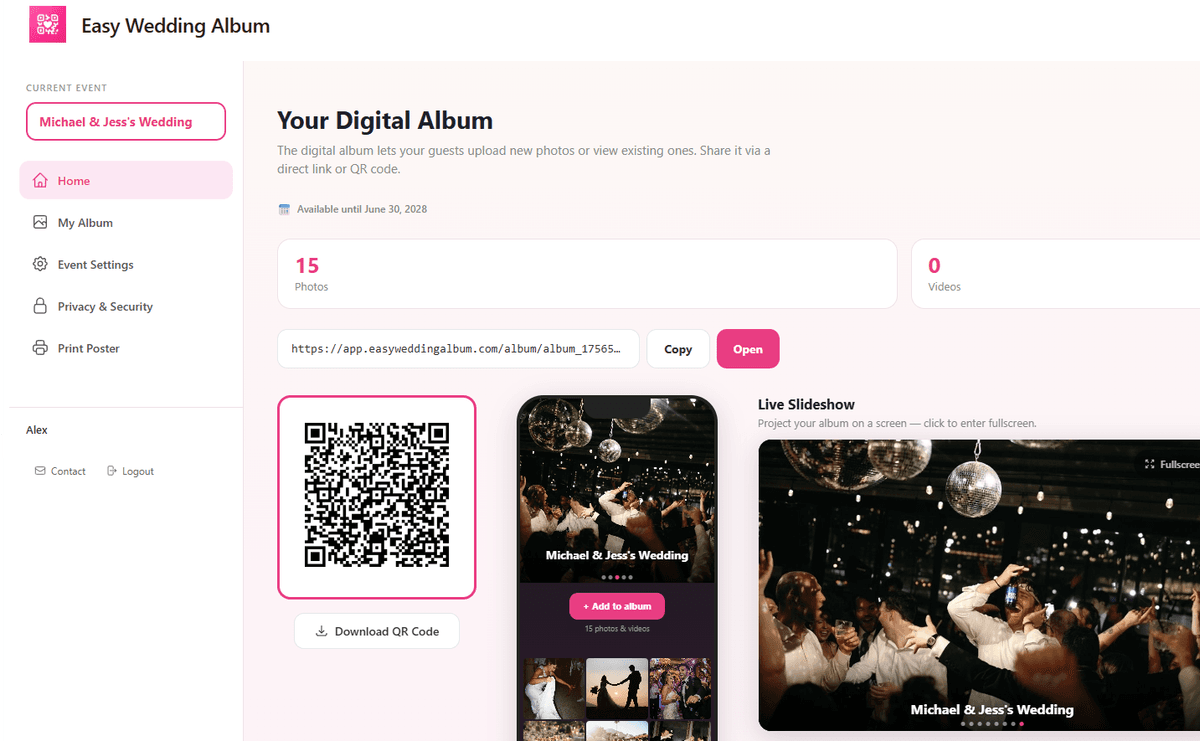
The QR code, the transparent PNG export and the customisable poster all live on your album home.
Also in this release
A photo of you two, on the guest page
Add a portrait of the couple above your album title — displayed as a round or square medallion. It makes the page unmistakably yours the second a guest scans the QR code.
Long videos, no fuss
Upload timeouts were extended — long speeches and first dances now go through without a fight.
HEIC photos from Android fixed
Apple's HEIC format shared into an Android phone used to fail on upload. It now converts server-side and lands in the album like any other photo.
A calmer album header
The Security status — protected or public — now sits next to your album title, so you can see at a glance whether the password is on, without opening the settings.
Why this update is really about the week after the wedding
Most wedding photo apps stop caring the moment the party ends. The QR code did its job, the photos are in, and the album becomes a folder nobody opens twice.
These four features are all aimed at the days after. Names turn an anonymous pile into something you can navigate — you remember your cousin was at the church, so you filter by her name and find the shots the photographer missed. Folders turn 800 photos into six moments you can actually send to your parents. Guest downloads mean people stop asking you for files, because they can take them themselves. And the poster, well, that one is for the week before.
Every one of them is included in the same one-time $29 — no upgrade tier, no add-on, no subscription that quietly renews next spring. Existing albums got all four automatically, including albums created a year ago.
Start the season with an album that sorts itself
Guest names, folders, guest downloads and the customisable poster are live now for every album — new and existing. Nothing to upgrade, nothing to install.
Ready in 2 minutes
Frequently Asked Questions
Do guests have to give their name to upload photos?
No. The first name is optional — a guest can tap Skip and upload anonymously, exactly as before. Their photos are simply labelled Guest. We ask for a first name only, never an email, and there is still no account and no app to install.
How many folders can I create?
Up to 12 folders per album, with names of up to 30 characters. Folders are opt-in: if you never press Organise into folders, your album stays exactly as it is today.
If I delete a folder, do I lose the photos in it?
Never. A folder is a filter over your gallery, not a container. Deleting one moves its photos back to Unfiled — they stay in the album, and they were visible in the main gallery the whole time anyway.
Can my guests download the photos without my permission?
No. Allow guests to download is off by default. Until you switch it on, guests can view the album but not save anything from it. You can turn it on after the wedding and off again at any point.
Why does my iPhone save a ZIP file instead of photos?
Above 20 items at once, iOS can only hand over a ZIP archive, which goes to the Files app rather than your photo library. Select 20 or fewer and they save straight into Photos. The app now warns you before the download starts, so there is no surprise.
Do these features work on albums I created before September?
Yes. Every existing album received all four features automatically, with no migration and no action needed from you. Photos uploaded before the update simply sit in Unfiled and show no guest name.
Is any of this an extra paid option?
No. Guest names, folders, guest downloads and the customisable poster are all included in the one-time $29, alongside unlimited photos, video uploads, the Live Slideshow and the privacy controls. There is no subscription and no upgrade tier.